Stumbling Through an APK File

In this post, I will showcase my process of learning how to analyze an APK file. Operative word there being “learning”, going into this I did not know the first thing about android malware. By the end of it I had a basic understanding of how to enumerate IOCs and capabilities of an Android app.
The Sample
I sourced this sample from the Malware Hunter Team on Twitter/X. Looking at it’s details in VirusTotal, there is a section for Interesting Strings.

Using this, I set out to find these IOCs in the binary and work from there.
Side Note: this IOC, 89.23.98[.]16 had a hostname of WIN-LIVFRVQFMKO at the time of analysis, this hostname is seen in various IR reports, https://www.shodan.io/host/89.23.98.16

Analysis
Starting out, I used apktool to decompress the file. (Reference: REMnux Documentation)

I searched the resulting files for one of the IOCs to start off my investigation.
find -type f | xargs grep --color=always 89\.23\.98\.16
First thing I notice is this “.smali” extension, some Googling suggests this is a decompiled representation of the code that will actually be executed.
Seeing the URLs, I wanted to build a one-liner to extract all of them from all of the files. Using the same combination of find and xargs grep I came up with the following. (Please note, this regex does not grab the entire URL, just everything up to the 1st forward-slash following the domain/IP).
find -type f | xargs grep --color=always -E -o "http[s]*://\w[^\/]+" 2> /dev/null
Given that “schemas.android.com” is extremely common, I exclude it to get the URLs I actually care about.
find -type f | xargs grep --color=always -E -o "http[s]*://\w[^\/]+" 2> /dev/null | grep -v schemas\.android\.com
Looking at the “SmsService$3.smali” file for those URLs shows, what looks to be, a setup for sending a POST request inside of a function call. (Really just a hunch because it looks like “v13” is defined and then immediately called in “performPostCall”; also notice the reference to SmsService without the $3 in it).

Assuming this is calling a function from another file, I search for it the same way as before.
find -type f | xargs grep --color=always -E -o performPostCall 2> /dev/null | sort -u
grep -A 25 performPostCall ./smali/com/WSCube/ControlPanel/SmsService.smali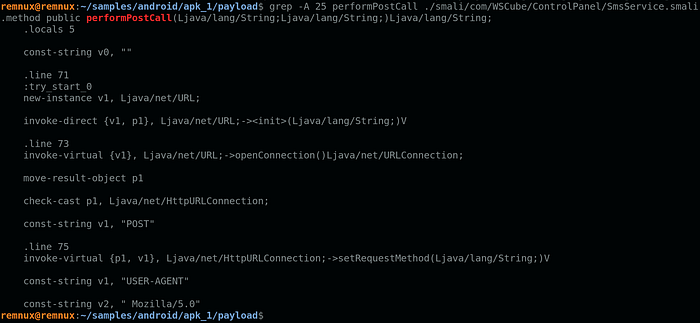
Sure enough it is setting up a POST request in a different file called “SmsService.smali”. Which also has a function setting up a GET request.
find -type f | xargs grep --color=always -A 10 -B 20 '"GET"'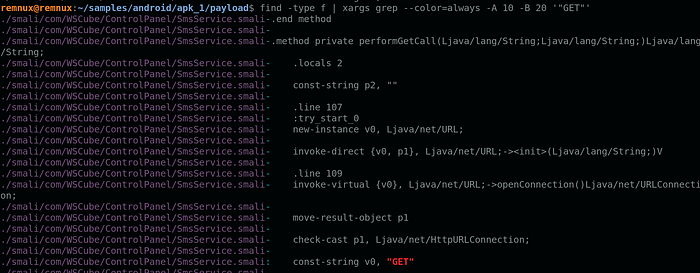
I was unable to confidently determine what data is supplied to the GET and POST requests so I moved on to determining what data the app has access to. But it should be noted that visiting the domain seen earlier, api[.]ipify[.]org returns your current public IP.
Looking around, I found a reference that calls out how Android permissions are defined and crafted a search to find them (Reference: Exploit DB PDF).
find -type f | xargs grep --color=always -E "android\.permission\.\w+" 2> /dev/null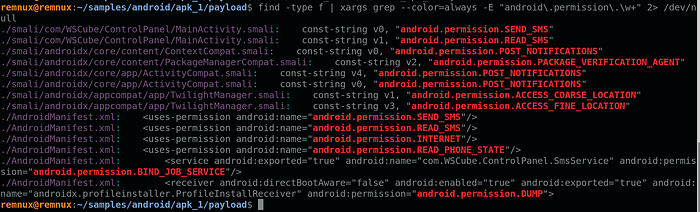
Now we know the capabilities of the malware. (Reference: android.com)
- Reading and Sending SMS — READ_SMS, SEND_SMS
- Accessing Location Data (rough and precise) — ACCESS_COARSE_LOCATION, ACCESS_FINE_LOCATION
- Access the internet — INTERNET
- “retrieve state dump information from system services” — DUMP
- “Allows read only access to phone state, including the current cellular network information, the status of any ongoing calls” — READ_PHONE_STATE
Next, manually reviewing some of the files I stumbled across a function retrieving the device name.
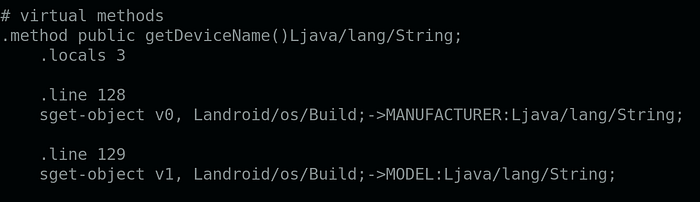
This gave me an idea to see what other device info is accessed. Which appears to be the brand, model, manufacturer, and fingerprint.
ind -type f | xargs grep --color=always -E "Landroid/os/Build;->[^:]+" 2> /dev/null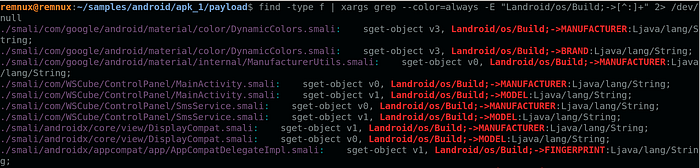
Conclusion
This is meant to be an introductory post, from a beginner for beginners. Despite not definitively confirming what data is sent/received over the internet, I still consider this a success as I was able to extract IOCs and determine capabilities.
To make this process repeatable I made a small bash script. Just decompress the APK file and place this in the top folder in the resulting file structure.
#!/bin/bash

echo [+] URLs
find -type f | xargs grep --color=always -E -o "http[s]*://\w[^\/]+" 2> /dev/null | grep -v schemas\.android\.com
echo

echo [+] IPs
find -type f | xargs grep --color=always -E '[0-9]{1,3}\.[0-9]{1,3}\.[0-9]{1,3}\.[0-9]{1,3}' 2> /dev/null
echo

echo [+] Android Permissions
find -type f | grep -v $0 | xargs grep --color=always -E "android\.permission\.\w+" 2> /dev/null
echo

echo [+] Device Info Referenced
find -type f | grep -v $0 | xargs grep --color=always -E "Landroid/os/Build;->[^:]+" 2> /dev/null

